This is how I audit, written down so precisely that an AI can follow it. I turned my method into a skill for Claude: it researches who the product is for, walks the key tasks, checks the fundamentals like a QA tester, and writes a report where every finding has a screenshot and a source. Then I tested it the way I'd test any product, and found the part it can't do without me.
AI toolingUX audit methodClaude skillNN/g researchWCAG 2.2 AA
AI checks,I decide.
UX audit · Standard depth · 10 October 2026
The Hacker News: for security practitioners
Site
thehackernews.com
Audience
Security practitioners
Devices
375, 834, 1366, 1920 px
Auditor
Claude, ux-audit skill
Strong reporting, weak wayfinding and trust signals
The journalism serves practitioners well: vulnerability stories give the CVE, severity score, exploitation status and fixed versions, and link the vendor advisory. The site around it gets in the way.
0Catastrophe
6Major
4Minor
4Cosmetic
Top 3 issues
Search sends readers to a Google page, outside the site
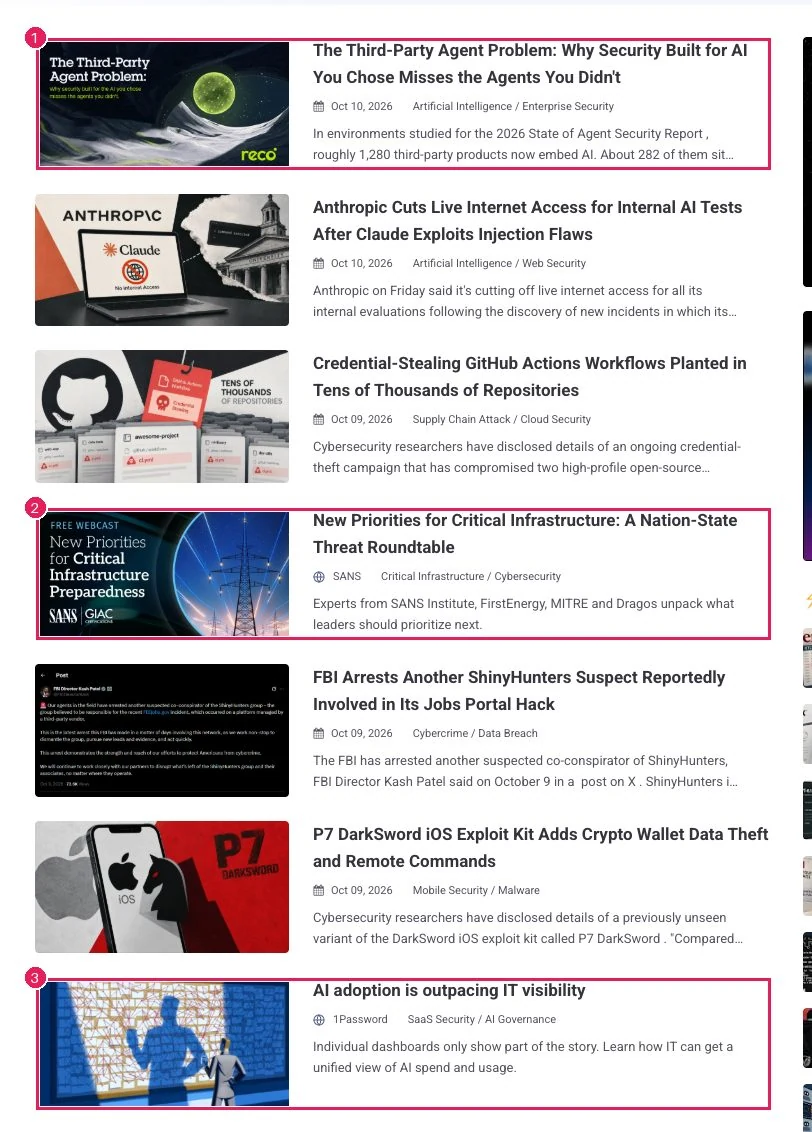
Sponsored stories look like news
The newsletter sign-up ticks hidden opt-ins for a lead-generation partner
Senior audits are slow, and they depend on who does them
A good UX audit takes a senior designer days. Two designers will also find different things.
Understanding the audience, walking the tasks, checking hundreds of details, finding evidence for every claim, and writing it up so product managers and developers act on it: that's the job.
I wanted to see how much of that an AI could do reliably if it had a real method and real research behind it, not just "look at this page and tell me what's wrong".
My method, a knowledge base and guardrails
The skill is a set of instructions, references and small tools that Claude follows step by step. I wrote the method; the knowledge comes from Nielsen Norman Group's published research, summarised in my own words.
The method, in seven steps
ResearchWho the product is for, in its own words (About, Advertise, Pricing pages), its business model and top tasks.
Real screens375, 834, 1366 and 1920 px, not one default size.
Structure firstNavigation, contexts and the main action on each screen.
Walk the tasksAs the real audience, including sign-up and change tasks.
QA pass33 fundamental checks on every audit: every link, search, Back, forms, 404, speed, keyboard.
Rules and evidence275 rules; every finding cites a specific article or WCAG criterion.
ReportSeverity, a marked screenshot for every finding, and a coverage table.
The knowledge base
research articles indexed
1,766
article notes in my own words
418
audit rules in 17 areas
275
QA checks on every audit
33
Guardrails
No invented sources. It never cites a source that isn't in the index. A made-up link stops the build.
View only. It never submits a form, buys anything or enters credentials.
Research and opinion kept apart. Its own rules of thumb are labelled as recommendations, not research.
Honest credit. Reports say "Expert review pending" until a person has reviewed them.
A blind test on a public site
I gave the skill one line, "Audit the UX of thehackernews.com", in a fresh session with no hints.
The Hacker News is one of the largest security news sites, read by millions of professionals. The skill researched the audience first, then walked the tasks a security practitioner comes with: see what's urgent today, look up a CVE or a vendor, follow a story to the vendor's advisory.
The result is one report that a product manager can read in ten minutes and a developer can act on: 14 findings, grouped into structure, interaction and surface, sorted by severity, each with a marked screenshot. Its main parts follow.
First, who the site is for
Before auditing, the skill researched the audience. The site's own Advertise page names security researchers, incident responders and DevSecOps teams.
Audience
Security practitioners. The site says it reaches "over 35 million security professionals each year" and names "security researchers, incident responders, DevSecOps teams".
Business model
Advertising and sponsorship, plus lead generation through eBooks and the newsletter. Success means page views and sign-ups; the tension is paid content against reader trust.
Top tasks
See what's new and urgent today
Look up a CVE or vendor
Check whether a story changed
Follow a story to the vendor advisory
Sign up for the newsletter
Conventions
Two competitors skimmed: both keep search on their own site and label paid items "Sponsored".
A score for each of Nielsen's ten heuristics
Showing the 3 weak heuristics.
Nielsen's ten usability heuristics, the status the audit gave each, and why
Heuristic
Status
Why
Visibility of system status
Weak
Invisible keyboard focus; story updates undated; a heavy homepage.
Match with the real world
Needs work
Practitioner vocabulary is spot on; paid content isn't called paid.
User control and freedom
Needs work
Search and new tabs pull readers off the site.
Consistency and standards
Needs work
Phone and desktop navigation differ; search works unlike competitors'.
Error prevention
Weak
Pre-ticked hidden opt-ins.
Recognition rather than recall
Needs work
Topics hidden on phones; card labels aren't links.
Flexibility and efficiency
Needs work
No keyboard path to search; no newest-first default.
Aesthetic and minimalist design
Needs work
Clean cards, but endless motion in the header and thumbnails.
Recognise and recover from errors
Weak
The 404 page is a dead end.
Help and documentation
Strong
About, contact and tip-off routes are easy to find.
Every finding: evidence first, then the fix
Search takes readers off the site to a Google page
3 · Major
A04 Search
A02 Navigation
H3
H4
Jakob's law
Quick win
Header at 1366 px. (1) The header search. It doesn't search inside the website; it sends the query to Google.
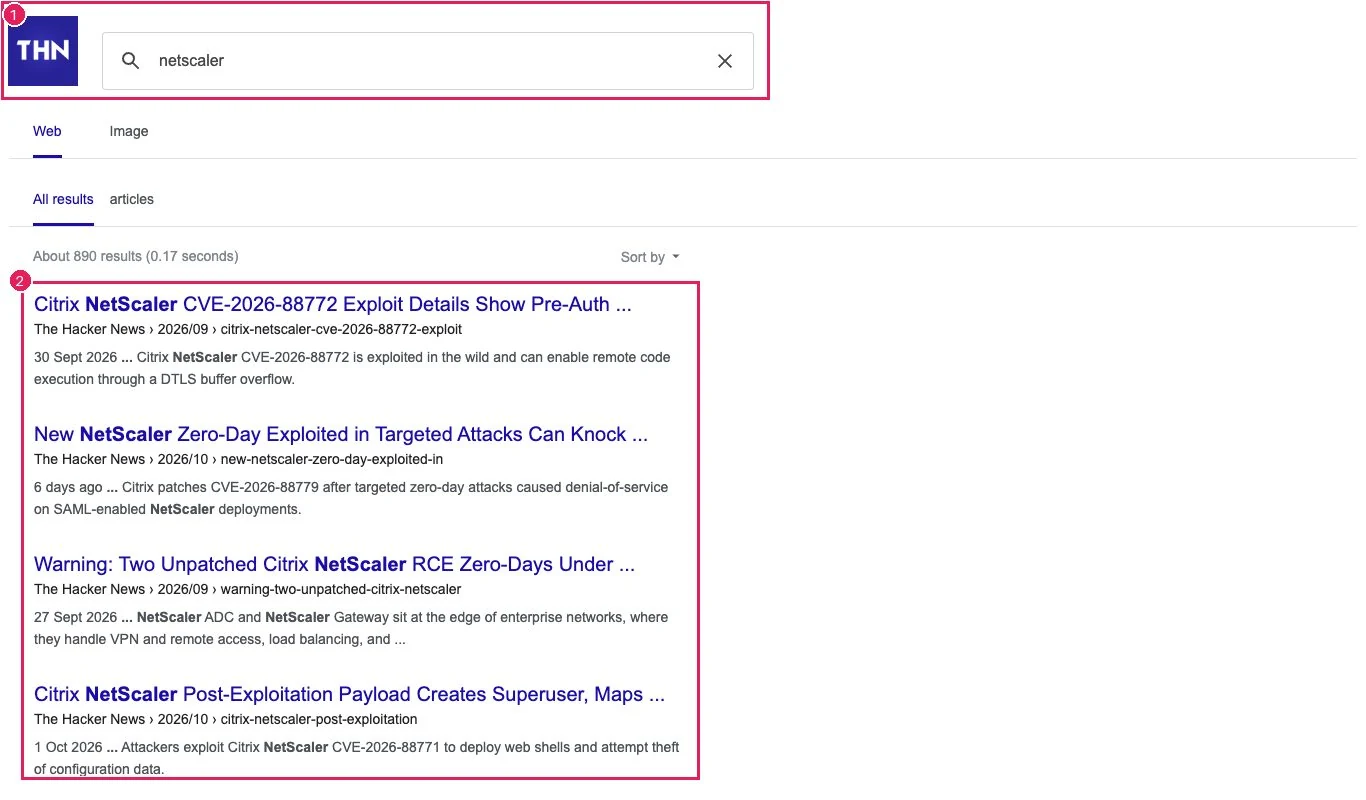
What a search for "netscaler" opens, at 1366 px. (1) cse.google.com: no THN header, sections or footer, only a small logo. (2) Results by relevance: the newest critical NetScaler story (Oct 9) is fifth.
Where
The search icon in the header on every page, desktop and phone
What happens
A normal search ("netscaler") is sent to google.com/cse, and readers land on an external Google page: a different design, a browser tab titled "Programmable Search Engine", no THN menu, sections or footer. The site does have its own search page, but the header search doesn't use it. Results are sorted by relevance, so the Oct 9 story about a CVSS 9.5 flaw comes fifth.
Search is the practitioner's fastest route to "what's the latest on this CVE". Being dropped onto an unbranded third-party page breaks the sense of place and makes it harder to get back to browsing. Two competitors keep search results inside their own layout.
Fix
Point the header search at the site's own search, Blogger's /search?q=, or embed the Google results inside a THN page with the normal header and footer. Default news results to newest first, with relevance as an option.
Sources
Universal Navigation: Connecting Subsites to Main Sites 2016Search: Visible and Simple 20017 Ways to Improve Your Website's or Intranet's Built-In Search Engine 2016
Coverage: nothing is skipped silently
The 33 fundamental checks run on every audit, whatever the audience. Each one is marked, including the two it didn't get to.
Showing the 15 failed checks.
The 33 baseline checks and the result of each on thehackernews.com
Check
Result
Note
B01Every header, nav and footer link lands where its label says
Pass
All 14 menu and footer links open the page their label promises. (The Free eBooks site blocked the automated check.)
B02Logo links home from every page
Pass
Clicking the logo always returns home, even from the error page and the Google search page.
B03"Where am I?" on inner pages
Partial
Section pages have matching titles, but the menu doesn't show which section you're in.
B04Leaving the site is expected and labelled
Fail
Search, the newsletter and paid stories take readers to other websites without saying so.
B05New tabs are consistent and marked
Fail
Some links open a new browser tab (“Expert Insights”, paid stories) and others don't. Nothing warns you which will.
B06Back returns to the previous page
Pass
Going from a section to an article and pressing Back works. Whether it keeps your place on the page wasn't checked.
B07Footer safety net
Pass
The footer has About, Contact, Advertise, Privacy and RSS, but no links to the topic sections.
B08Search is visible and keyboard-reachable
Fail
Search is only a small icon, and it can't be opened with the keyboard.
B09Search results stay inside the site
Fail
Results open on a Google page without the site's menu or sections, so readers lose their place.
B10Common and top queries find the best match first
Partial
One test search (“netscaler”): the newest critical story came fifth, not first.
B11Typo and plural
Not checked
Only one search was run, so misspelt and plural words weren't tried.
B12No-results page offers a way forward
Not checked
Not tried: what readers see when a search finds nothing.
B13Sort and filters fit the content
Partial
The Google page has a small “Sort by” option, but it sorts by relevance, not newest first.
B14Dates and update notes
Fail
A headline still says “Unpatched” after fixes came out, and story updates carry no date.
B15No broken bits
Pass
No broken images or leftover placeholder text on the pages checked.
B16Ads and paid content are labelled
Fail
Paid stories look like news: nothing says “Sponsored”, and the sponsor's name sits where the date usually is.
B17About, contact, privacy easy to find
Pass
In the footer and the ☰ menu; the About page gives an email address.
B18Cookie / consent banner is fair
N/a
No cookie banner appeared from the test location, so there was nothing to judge.
B19Fields have visible labels
Fail
The newsletter field's only hint is grey text that disappears as you type, and the send button is an arrow with no words.
B20No hidden or pre-ticked opt-ins
Fail
Two newsletter checkboxes are ticked in advance and hidden, so readers agree to things they can't see.
B21Form posts to the site or a named partner
Fail
The newsletter form sends your email to a lead-generation company, and nothing near it says so.
B22Validation of empty required fields
Pass
Sending an empty email is blocked by the browser. (The form itself was never sent.)
B23Helpful 404 page
Fail
A broken link shows a page with no message and no way back to the stories.
B24Empty and loading states
N/a
None of the pages checked had lists that load in or can be empty.
B25Every width: no horizontal scroll or overlap
Pass
No sideways scrolling or overlapping at 375, 834, 1366 and 1920 px wide.
B26Touch targets on phone
Fail
On phones the social icons are about 22 px and close together, so it's easy to tap the wrong one.
B27Sticky elements don't cover content
Pass
Nothing stays pinned over the text; the share buttons sit in the left margin.
B28Speed / page weight
Fail
The homepage downloads 4.4 MB, mostly one animated ad image. An article is about 0.2 MB.
B29Layout shift
Pass
Pages don't jump around while they load.
B30Keyboard access and focus
Fail
Keyboard users can't see where they are: nothing highlights the focused link, and there's no “Skip to content” link.
B31Automated scan (axe)
Fail
An automated accessibility scan found errors on articles and on the phone homepage: low contrast, an unnamed link, small tap targets.
B32Page basics: lang, one H1, titles, landmarks
Pass
Every page declares its language, has one main heading and a unique title, and is split into clear regions for screen readers.
B33Motion: pause and reduced motion
Fail
The header slogan animates forever, even when the device asks for less motion, and there's no pause button.
Can people use it with a keyboard, without a mouse, without being rushed?
2.1.1Keyboard: search can't be opened without a mouse
2.4.7Focus visible: nothing shows where focus is
2.2.2Pause, stop, hide: the header slogan animates forever
2.4.4Link purpose: an image link with no name
2.5.8Target size: social icons too small on phones
Perceivable
1 failed
Can people see the content?
1.4.3Contrast: white on light-blue share buttons, 2.82:1
Understandable
1 failed
Is it clear what to do?
3.3.2Labels: the newsletter field's only label is a placeholder
Robust
1 failed
Can screen readers understand it?
4.1.2Name, role, value: the search toggle and menu button are unnamed
The barriers concentrate in Operable: a keyboard user can neither see where they are nor open search. Press Tab on any page to see it.
Every finding can be checked on the live site
I re-checked the boldest claims on the site myself. They held.
You can check them too, in about a minute each. As observed on 10 October 2026; sites change.
Search leaves the site
How to checkType anything into the search on thehackernews.com: the results open on a Google page, without the site's menu or sections.
Sponsored stories look like news
How to checkScan the homepage feed: some items are paid placements, and nothing says "Sponsored". The vendor's name sits where the date usually is.
The newsletter form has hidden, pre-ticked options
How to checkView the page source and search for opt_001: two checkboxes are ticked by default and hidden from view, and the form sends your email to a lead-generation company.
Keyboard focus is invisible
How to checkPress Tab a few times on any page: focus moves, but nothing on screen shows where it is.
It's accurate. It's not independent.
Every report the skill produced was accurate: when I re-checked its claims on live sites, they held.
But accurate isn't the same as good. Each time I reviewed a report as the expert, I found something it couldn't see on its own, and each time I turned that into a change to the method.
Round 1 of 5
What I caughtIt reported a deliberate brand animation and an honest "work in progress" label as defects.
What changedIt now judges motion by its cost to the user, and treats work in progress as a content choice.
Round 2 of 5
What I caughtOn a streamer tool it checked page details but missed the big picture: a layout squeezed into 40% of a wide screen, two products in one navigation, the main task hidden behind a mode.
What changedA structural pass before any detail, real screen sizes up to 1920 px, and tasks walked as the actual user.
Round 3 of 5
What I caughtOn a bot dashboard it read pages as text and missed cards blending into each other. Its reports were also walls of text.
What changedA marked screenshot for every finding, and a rule: look at every screen, don't only read it.
Round 4 of 5
What I caughtOn The Hacker News it first audited for "general tech readers". The site's own pages say its readers are 35 million security professionals. Every finding was correct, and the report still missed what mattered to them.
What changedIt now researches who the product is for before asking anything.
Round 5 of 5
What I caughtFocused on specialists, it buried a fundamental problem (search sending readers to Google) in one sentence of another finding. When I pointed that out, it overcorrected and tested search with a single query.
What changed33 QA-style checks on every audit, an automatic page probe, and a coverage table. Search still needs a proper set of test queries: that's next.
The blind test: same site, three runs, one day
Six issues across the three runs. The number on each run is how many of them it found.
Which issues each of three runs found on The Hacker News
Issue on The Hacker News
Run 1
Run 2
Run 3
Search leaves the site for Google
Found
Buried
Found
An ad fills most of the phone's first screen
Found
Missed
Missed
A floating Share button covers article text
Found
Missed
Missed
Key facts start below the first screen
Missed
Found
Missed
Vendor tags are hidden and incomplete
Missed
Found
Missed
A headline still says "Unpatched" after the patch
Missed
Missed
Found
Each run found 11 to 14 issues. Together they found about 25. A single run catches roughly half of what the skill is capable of finding, and a different half each time.
"It's a good example of how AI can work with an expert, and why it can't stand alone."
What the AI brings, and what the designer brings
The skill
Breadth. Every link, contrast in both themes, hidden form fields, four screen sizes, in one run.
Evidence. Measured numbers, marked screenshots and a source for every claim.
Speed. Hours of checking done in minutes.
Discipline. It re-checks surprising results and drops its own false alarms.
The designer
Framing. Deciding who the audit is for and which task matters most.
Priority. Knowing a buried basic problem outranks a clever specialist one.
Noticing absence. What isn't on the page at all.
Consistency. Judging whether the report tells the true story, not just a list of defects.
The skill made me faster and more thorough. It never made me unnecessary.
The most valuable thing it produced wasn't a report. It was a clear picture of which parts of a senior designer's work are method, and which are judgement.
What's next
Test cases for each task, written before testing, and a task scorecard at the top of every report.
Several independent passes merged into one report, to close the gap between runs.
A regression set built from my reviews, so a new fix never undoes an old lesson.
Independent project, not affiliated with or endorsed by Nielsen Norman Group or The Hacker News. Guidance is drawn from Nielsen Norman Group's published articles and the W3C Web Content Accessibility Guidelines 2.2. The research notes and rules are private.